Stop playing phone tag. Let customers schedule their own service calls in 60 seconds—day or night.
Plumbing problems don't wait for business hours. A burst pipe at 2 AM, a backed-up sewer line on Thanksgiving morning, a water heater that picks the coldest day of the year to quit—these are the calls that define a plumbing business. But here's what most plumbers miss: the emergency customer isn't your only customer. There's also the homeowner who's been meaning to replace that dripping faucet for six months, or the one planning a bathroom remodel. These customers do their research during lunch breaks and after dinner. They visit your website, poke around, and leave. Unless you give them a reason to stay.
How many times does it take to schedule a simple drain cleaning? Customer calls. You're on another job. They leave a voicemail. You call back. They don't answer. They text. You respond. They need to check their calendar. Two days later, the appointment is finally set. Or they've already called someone else.
"The average plumbing company exchanges 4.2 calls or messages just to schedule a single appointment. Every extra step is another chance to lose the customer."
Phone tag isn't just annoying—it's expensive. While you're chasing down one customer to confirm Tuesday at 2 PM, three other people visited your website, didn't see an easy way to book, and moved on to the next Google result. The plumber with online booking captured them in 60 seconds while you were stuck in voicemail hell.
A scheduling system that works 24/7, embedded right on your website. No apps to download, no third-party booking pages. Just a simple form that syncs with your calendar.
Shows only open time slots from your calendar—no double bookings
Customers pick the service they need before booking
Instant email and SMS confirmation sent to customer
Automated reminders reduce no-shows by 40%
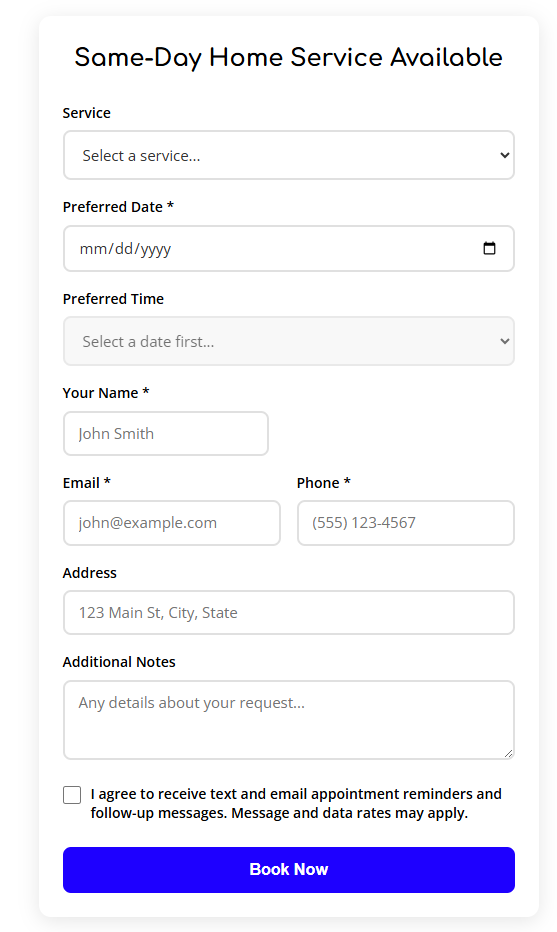
They select the service (drain cleaning, water heater repair, leak detection), pick an available time slot, enter their contact info, and they're done. Confirmation email hits their inbox instantly. No phone calls required.
New appointment appears on your calendar with all the details: service needed, customer contact info, address, preferred time. You can confirm, reschedule, or add notes—all from your phone between jobs.
Set up booking for scheduled maintenance and non-emergency work. Emergency calls still come through your phone—but routine appointments can book themselves.
The average plumber spends 45 minutes per day playing phone tag and scheduling appointments. That's nearly 4 hours a week—time you could spend on billable work.
Online booking doesn't just capture more appointments—it gives you back the hours you used to waste coordinating schedules. Four extra billable hours per week adds up to $2,400 per month in reclaimed revenue.
You control which services are bookable online. Emergency plumbing (burst pipes, severe leaks, sewer backups) should always be phone calls. But routine work—drain cleaning, faucet repairs, water heater maintenance—can easily be self-scheduled. Most plumbers set emergency calls to "call only" and let everything else book online.
Yes. The booking widget syncs with Google Calendar, Outlook, or any calendar that supports iCal feeds. When someone books online, the appointment appears on your calendar instantly. Changes you make on your calendar (blocking time off, adding appointments manually) are reflected in real-time availability.
The widget only shows available time slots based on your calendar. If you're booked solid Tuesday through Thursday, those days won't appear as options. Customers see the next available opening—which might be Friday morning or the following week. No risk of double-booking or customers expecting same-day service when you're slammed.
Yes. You can set up optional or required deposits for certain services. Water heater installations or bathroom remodels might require a $100 deposit at booking. Simple repairs might not. You control the deposit amount per service type, and payment is collected at booking via Stripe.
Customers receive a confirmation email with a "reschedule or cancel" link. If they cancel more than 24 hours out, the time slot opens back up. Last-minute cancellations can trigger a fee (if you've configured deposits). You also get notified immediately via email and SMS when someone cancels, so you can fill the slot.
You get everything: name, phone, email, service address, service type selected, preferred date/time, and any notes they added. The appointment appears on your calendar with all details attached, and you receive an instant notification so you can confirm or reach out if you need clarification.
Let customers book themselves while you focus on the work. Online booking means more appointments, less wasted time, and a calendar that fills itself—even while you sleep.
Start Free Trial